


A newer version of the Gradio SDK is available:
6.1.0
title: Autonomous Rendering And Imaging Agent (A.R.I.A.)
emoji: 🚀
colorFrom: blue
colorTo: green
sdk: gradio
sdk_version: 6.0.1
app_file: app.py
pinned: true
short_description: MCP's 1st Birthday - Hosted by Anthropic and Gradio Project
tags:
  - mcp-in-action-track-creative
  - agent-course
  - stable-diffusion
  - agentic-workflow
license: apache-2.0
thumbnail: >-
  https://cdn-uploads.huggingface.co/production/uploads/68389182a9bdf98f9279e018/jr7YqXf2Q1rteSNJ7yIFB.png
🧬 A.R.I.A. (Autonomous Rendering & Imaging Agent)
"Autonomous reasoning for artistic execution."
A.R.I.A. is an AI Agent designed for the Track 2: MCP in Action (Creative Applications) category. It demonstrates a complete agentic loop—Reasoning, Planning, and Execution—to transform raw visual signals into complex artistic outputs without opaque "black box" generation.
🏆 Hackathon Submission Details
- Track: 🤖 Track 2: MCP in Action
- Category: Creative Applications
- Tag:
mcp-in-action-track-creative - Agent Vision: To create a system that acts as a "Digital Art Director," breaking down a user's vague intent into specific technical steps (Foundation vs. Atmosphere) and executing them sequentially.
🧠 Agentic Workflow (The "Reasoning" Core)
This application is not a simple filter. It utilizes a structured Chain-of-Thought (CoT) engine to simulate an artist's decision-making process.
1. Reasoning (Analysis)
The agent first analyzes the Input Signal (User Image) and the Semantic Intent (Prompt). It determines the necessary stylistic divergence based on the "Concept Divergence" parameter.
Log Example:
💭 THOUGHT: Analyzing input... Intent: 'Cyberpunk'. Strategy: Structure (Step 1) + Atmosphere (Step 2).
2. Planning (Tool Selection)
Based on the analysis, A.R.I.A. selects the appropriate tools from its registry:
- Foundation Tool: Selected to rewrite the texture matrix (e.g., Oil Painting to break digital edges).
- Atmosphere Tool: Selected to inject lighting and mood (e.g., Neon City for color grading).
3. Execution (Action)
The agent executes the plan in a multi-pass pipeline:
- Pass 1 (High Denoising): Destructive generation to establish the new style.
- Pass 2 (Low Denoising): Constructive generation to "glaze" the final output.
🖼️ Three-Step Image Gallery
This gallery represents the three-step pipeline workflow:
- Step 1: Foundation / Structural Style
- Step 2: Atmosphere / Lighting & Mood
- Step 3: Final Output
Example 1


Example 2


Example 3


🎥 Video Demonstrations
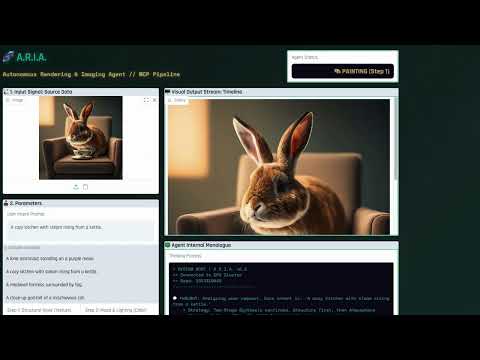
A.R.I.A. Video Demo
🎥 Watch ARIA.mp4 Demo
(Note: video can only be viewed after downloading)

💼 LinkedIn Showcase
🛠️ Technical Stack
- Frontend: Gradio 5 (Streaming interface for real-time feedback)
- Backend: Python / PyTorch / Diffusers
- Model: Stable Diffusion v1.5 (Optimized for CPU inference via Attention Slicing)
- UX: Custom "Mission Control" CSS theme with Typewriter-style logging to visualize the Agent's thinking speed
🚀 How to Use
- Upload a source image (sketch, photo, or 3D render).
- Define Intent: Type a prompt (e.g., "A lonely rover on Mars").
- Configure Agent:
- Foundation: Choose the base texture style.
- Atmosphere: Choose the lighting/mood context.
- Initialize: Click Initialize Agent Sequence.
- Observe: Watch the Chain-of-Thought Log as the agent thinks, plans, and executes the visual transformation in real-time.
- Compare: Review multiple outputs in the three-step gallery grid.
📦 Local Installation
pip install gradio diffusers torch transformers scipy
python app.py